Model Catlog Builder
Provider-first model catalog starter for AI apps, with normalized model metadata, routing config, starter APIs, and an admin console for managing providers and fallback chains.
An embeddable LLM configuration starter for AI applications.
This repository helps developers stop hardcoding provider lists, model IDs, and fallback logic inside their apps. It gives you a provider-first model catalog, an OpenClaw-style routing layer, starter APIs, a demo server, and a Next.js starter app with an admin console.
Current Status
This project is at the MVP stage.
What that means today:
- It already works as a reusable package and starter for Node.js and Next.js AI applications.
- It already supports real provider/model configuration flows instead of static JSON prompts.
- It has already been validated in one real application integration.
- It is best suited for solo developers and small product teams that want to add model configuration to an existing AI app quickly.
What it is not yet:
- a universal enterprise control plane
- a zero-customization package for every stack
- a finished platform for every provider or deployment model
Screenshots
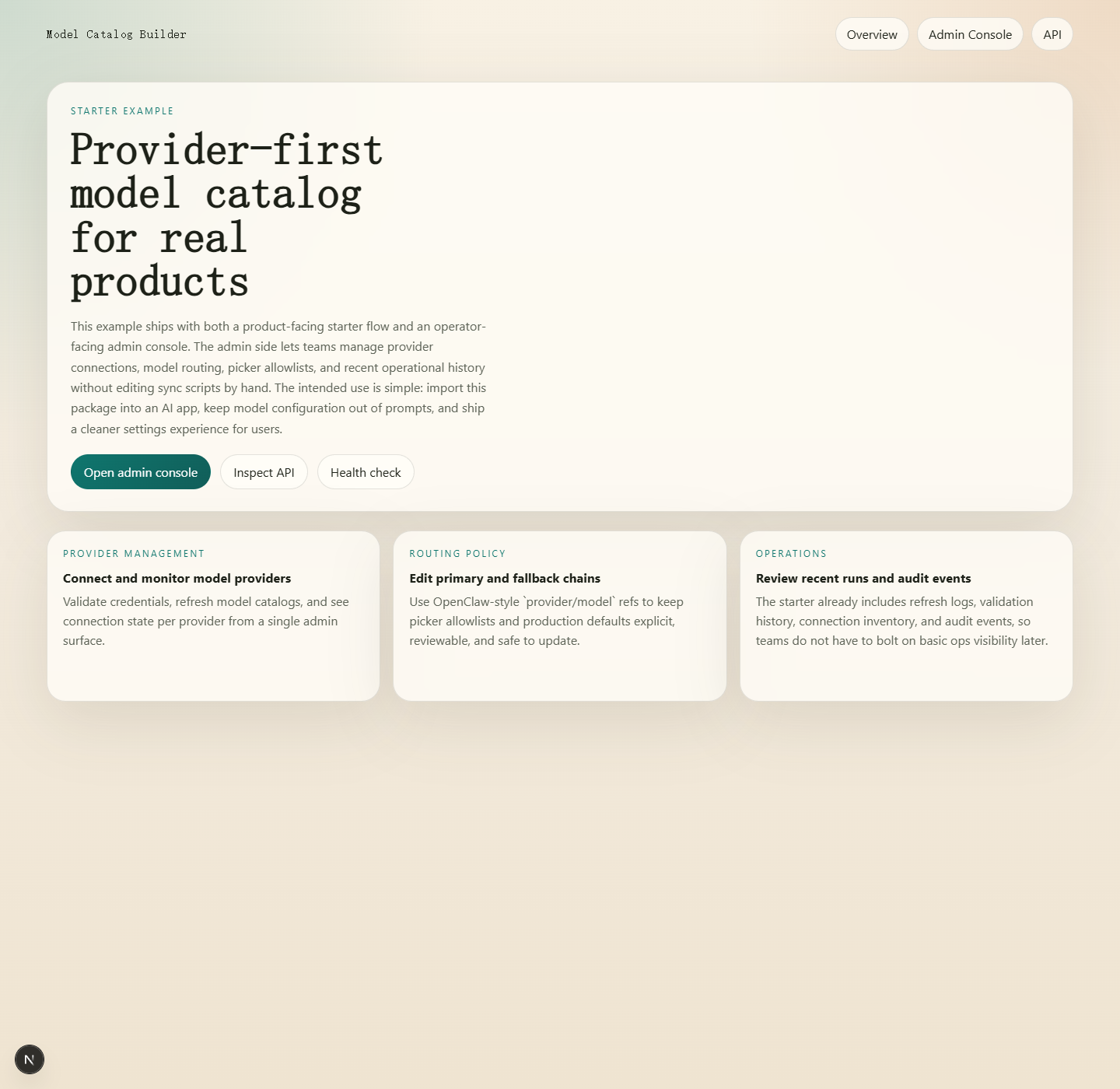
Starter landing page
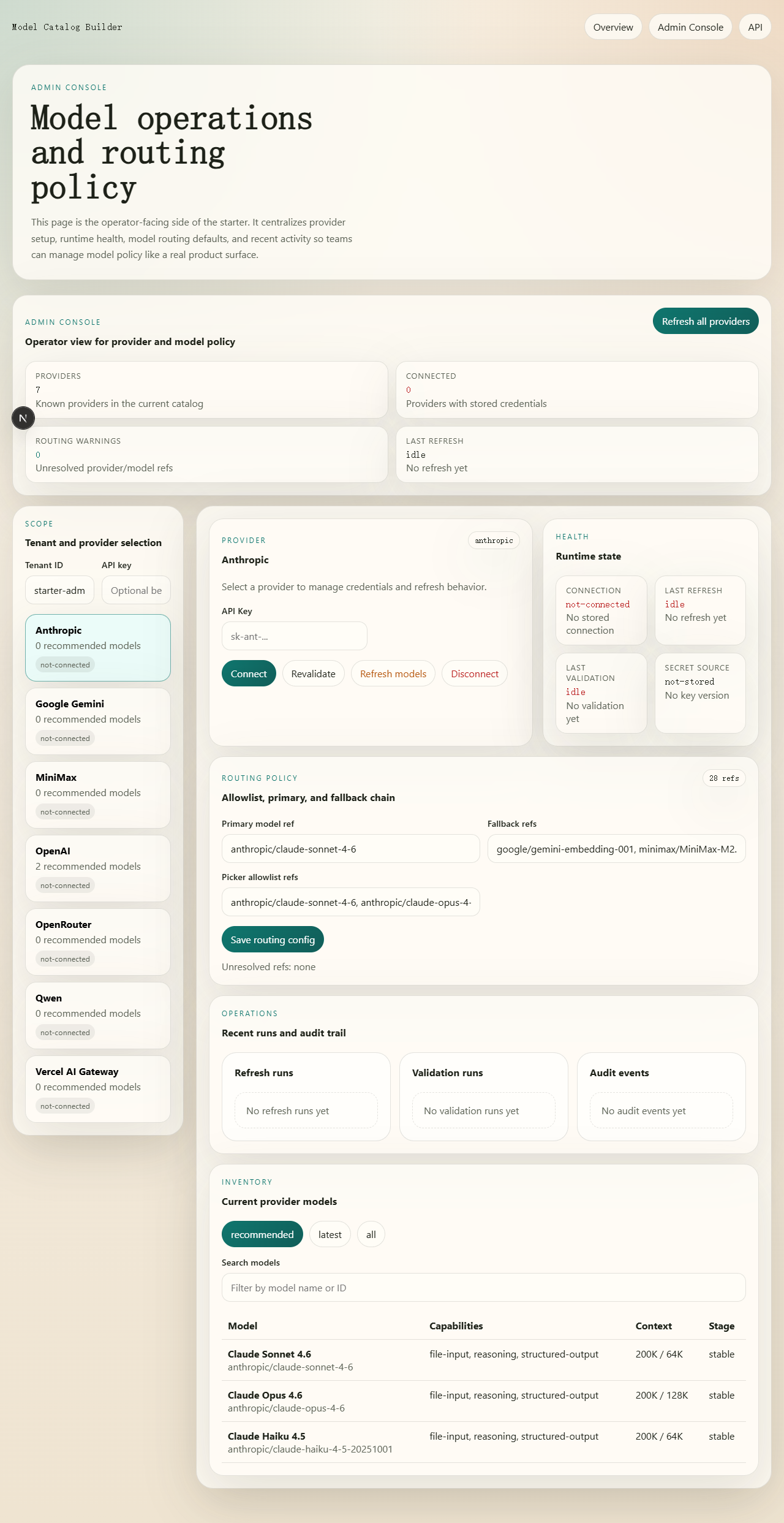
Admin console
Configuration Flow
What You Get
1. Provider-first setup
Define which providers your product exposes and how each one should be configured.
- provider registry
- provider-specific auth fields
- setup help text
- discovery strategy per provider
2. Normalized model catalog
Sync model availability and metadata into one app-friendly structure instead of exposing raw upstream JSON directly to your frontend or agent.
- provider list
- model list
- recommended/latest/all groups
- normalized metadata such as context, pricing, capabilities, and source
3. Model routing config
Use an OpenClaw-style configuration model for defaults and fallback behavior.
provider/modelrefsprimaryfallbacksallowlist- auth profile order metadata
4. Starter API
Use the included API surface instead of re-implementing provider and model config endpoints from scratch.
- list providers
- get provider setup
- validate credentials
- connect / revalidate / disconnect
- list models
- refresh models
- get / update model routing config
- health and runtime endpoints
5. Starter UI
Use the demo server or the Next.js example to get a working provider/model configuration experience fast.
- landing page
/adminconsole- provider connection flow
- routing configuration editor
- recent validation / refresh / audit views
Quick Start
Install dependencies:
npm install
Generate a normalized catalog:
npm run sync:catalog -- \
  --output output/model-catalog.generated.json \
  --registry assets/provider-registry.template.json \
  --overrides assets/catalog-overrides.template.json
Generate the routing config:
npm run init:model-routing -- --providers openai,anthropic,google
Run the demo server:
npm run demo
Then open http://localhost:4177.
Run the automated test suite:
npm test
Useful test commands:
npm run test:watchnpm run test:coverage
Fastest Ways To Use It
Option 1: Generate a standalone starter app
Best for developers who want a full working base with API + UI.
npm run scaffold:next -- ./my-model-catalog-app --name my-model-catalog-app
Useful scaffold options:
--template full--template api-only--providers global | china | minimal | all--providers openai,anthropic,openai-compatible--deploy vercel | render | none--multi-tenant--api-auth
Example:
npm run scaffold:next -- ./china-api --template api-only --providers china --deploy render --multi-tenant --api-auth
Option 2: Embed the starter API into an existing app
Best for teams that already have an AI app and only want to add provider/model configuration.
Start with:
- references/integration-guide.md
- references/api-contract.md
- assets/starter-api/index.mjs
- assets/starter-api/createStarterApiService.mjs
After onboarding, your app can consume the generated user profile artifact instead of reading raw routing files:
import {
  createUserModelProfileClient,
  loadUserModelProfile,
} from 'model-catlog-builder';

const profile = await loadUserModelProfile('./output/tenants/default/user-model-profile.json');
const client = createUserModelProfileClient(profile);
const textPrimary = client.getPrimaryModel('model');
Runnable example:
node examples/consume-user-model-profile.mjs --tenant default
If you want a more app-shaped handoff object, there is also a concrete adapter example:
import {
  buildAiAppConfigFromProfile,
  loadUserModelProfile,
} from 'model-catlog-builder';

const profile = await loadUserModelProfile('./output/tenants/default/user-model-profile.json');
const appConfig = buildAiAppConfigFromProfile(profile);
Runnable example:
node examples/build-ai-app-config-from-profile.mjs --tenant default
Option 3: Use only the config core
Best for teams that want to keep their own UI and runtime, but stop hardcoding model config.
Use:
- provider registry templates
- catalog sync script
- model routing config
- normalized catalog output
Repository Map
- SKILL.md: the full working guide for using this repo as a Codex skill
- assets/: starter API files, config templates, and routing config assets
- scripts/: catalog sync, routing config generation, demo server, and scaffolding
- examples/next-starter: a runnable Next.js example with
/admin - references/integration-guide.md: shortest path for importing this into an existing app
- references/deployment-playbook.md: deployment and production notes
Recommended Reading Order
If you are evaluating this project for adoption, read in this order:
- references/integration-guide.md
- references/api-contract.md
- references/product-patterns.md
- references/deployment-playbook.md
If you want the full implementation guide, then read SKILL.md.
Environment Notes
The starter supports a local development fallback for secrets when MODEL_CATALOG_SECRET is not set. That makes local setup easy, but production deployments should always provide an explicit secret.
If these environment variables are present, catalog sync will use official provider model lists before public catalogs:
OPENAI_API_KEYANTHROPIC_API_KEYGEMINI_API_KEY
MVP Scope
This repository currently focuses on one thing:
helping developers import a complete model-configuration flow into their AI application faster
That includes:
- provider selection
- provider-specific auth setup
- normalized model selection
- primary/fallback routing
- a basic admin workflow
It does not currently optimize for every product category or every provider-specific edge case.